


Insert or remove the SIM card
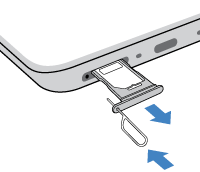
- Insert the tool into the hole in the tray and gently push to pop it out.
- Insert (gold contacts up) or remove the card.
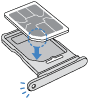
- Insert or remove the cards as needed.
Or, to use two physical SIM cards (not available on all models):
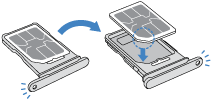
To see if your phone supports two physical SIM cards, go to Settings > About phone > SIM status. If you see SIM status (sim slot 1) and SIM status (sim slot 2), then you can use two physical SIMs in your phone.
- Push the tray back into the phone.
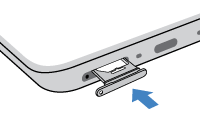
If you inserted two SIMs, you'll receive a notification to set them up. Swipe the notification down and touch it to manage dual SIMs.
Note: If you need to activate a SIM, contact your carrier